
Hifyre Website Manager is a Content Management System for the design and launch of branded online dispensaries. We’ve designed a system that allows users to customize the look and feel of the front-end e-commerce website, as well as manage and schedule promotions and announcements.
-
Set the overall brand design by uploading logos and selecting the colour palette for the site.
-
Add in promotions and/or messaging to the targets that you want to leverage. These can be done at the following levels:
-
Store
-
Takes precedence over Province/State or Brand.
-
-
Province / State
-
Will apply the updates to all stores within the selected Province/State.
-
An individual store may still be updated after a Province / State update.
-
-
Brand
-
Will apply the updates to all stores within the brand.
-
Each target can include a set action, directing the user to a pre-selected page, or to a custom page such as a specific product search.
The Homepage, Shop and Sitewide targets all allow for both a default and a scheduled asset. Three of the most visible targets also allow up to 3 scheduled assets, for efficient promotional planning.
Changes take immediate effect, unless scheduled for a future time.
For more information or questions about the setup and requirements, please contact your Hifyre representative.
Homepage
Hero Banner - Sits at the top of the homepage.
-
Allows for 1 default and 3 scheduled promotions.
-
Do not include text in the background image. The same image is used for both mobile and desktop, it’s possible the text will not be visible depending on the device type.
Featured Product Ad - Sits within the hero banner, below the picked just for you widget.
-
Allows for 1 default and 3 scheduled promotions.
Homepage Ad Banner - Sits between Top Reviewed and Best Sellers sections.
-
Allows for 1 default and 1 scheduled promotion.
-
Requires 2 assets: 1 mobile and 1 desktop.
Non-Member Callout - Sits at the bottom of the homepage when a user is not logged in.
-
Allows for 1 default promotion that is only visible to users not logged in.
-
Ideally used as a call to action to sign up as a member.
-
Do not include text in the background image. The same image is used for both mobile and desktop, it’s possible the text will not be visible depending on the device type.
Shop
Shop Information Message - Sits at the top of the Shop landing page as well as all search pages.
Ad Banner - Sits below the information message on all shop pages except the Shop landing page.
-
Allows for 1 default and 3 scheduled promotions.
-
Requires 2 assets: 1 mobile and 1 desktop.
Checkout
Cart Step Banner - Sits at the top of the cart page.
-
Ability to add an info message or 1 default promotion.
-
Promo requires 2 image assets: 1 mobile and 1 desktop.
Method /Single Page Banner - Sits at the top of the checkout page.
-
Ability to add an info message or 1 default promotion.
-
Promo requires 2 image assets: 1 mobile and 1 desktop.
Payment Step Banner - Previously available in the stepped checkout flow. With single page checkout this is no longer visible.
Sign Up Page
-
Header Title - Appears below the logo, above the email field.
-
Background - Displays behind the form and ad.
-
Ad - Optional. Displays to the right of form on desktop, and below the form on mobile.
Sitewide
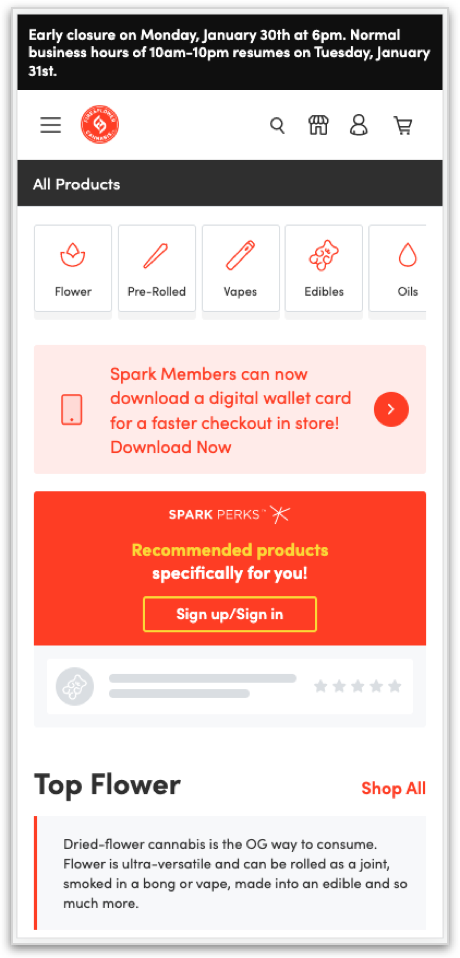
Nav Alert - Appears at the top of the page sitewide.
-
Text based message with ability to link to set action.
-
Can be scheduled to display for a specified time frame.
-
As users scroll down the page it will hide but will reappear once they scroll back to the top.

Actions
-
Various actions can be added to target that direct users to set pages or custom URLs:
Brand Defaults
-
Includes all of the previously outlined targets but updating/editing here will display out to the entire brand, unless a target is set at the store level.
-
Toggle on Edit Brand Defaults to view/edit targets at the brand level.
Bulk Updates
-
A bulk update will apply the changes to several stores at the same time.
-
Bulk updates can be made across all shops, or at the provincial/state level.
Settings
-
Brand settings, such as logos and brand colours, can be set by clicking on the gear icon to the right of the brand selector.
-
Settings are updated infrequently and will affect the entire branded site.
Asset List
Logos require a transparent background and should be SVG. If SVG is not available then a PNG with stated size is acceptable.
All other assets are in JPEG format.
|
Pixel Dimensions (px) |
Responsive |
Desktop |
Mobile |
|
SETTINGS |
|
|
|
|
Logo Primary |
- |
120 x W |
- |
|
Logo Secondary |
- |
- |
120 x W |
|
Age Gate Background |
3600 x 1900 |
- |
- |
|
Favicon / Browser Tab |
- |
32 x 32 |
- |
|
HOMEPAGE |
|
|
|
|
Hero Banner |
3600 x 1500 |
- |
- |
|
Ad Carousel |
280 x 280 |
- |
- |
|
Ad Banner (under Hero) |
- |
2500 x 160 |
600 x 180 |
|
Sign Up Section |
1800 x 950 |
- |
- |
|
SHOP |
|
|
|
|
Ad Banner (all pages except Shop All Product) |
- |
1900 x 210 |
600 x 180 |
|
CHECKOUT |
|
|
|
|
Cart Step Banner |
- |
1660 x 210 |
600 x 180 |
|
Method Step Banner |
- |
1660 x 210 |
600 x 180 |
|
Payment Step Banner |
- |
1660 x 210 |
600 x 180 |
|
SIGNUP |
|
|
|
|
Signup (background) |
3600 x 1900 |
- |
- |
|
Ad Section (Spark callout) |
600 x 990 |
- |
- |
On upload all files will be converted to webp format for file size optimization.